Glow: Crafting Radiant Digital Experiences for Skincare Brands
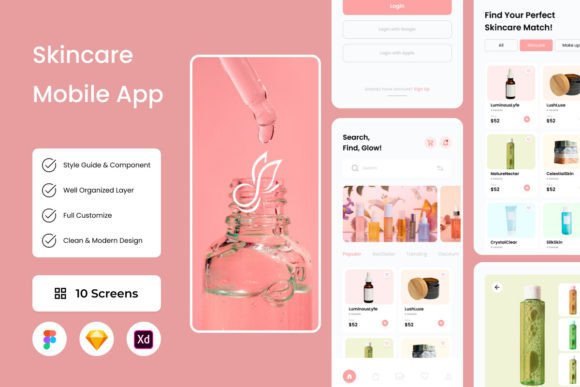
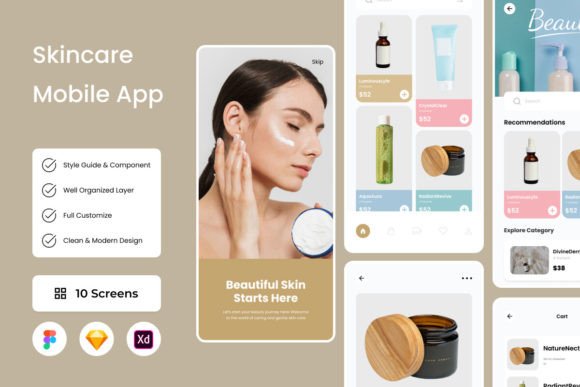
There’s a particular kind of magic in a skincare routine—the quiet confidence that comes from a moment of self-care, the visible results of consistent attention. Translating that feeling into a digital experience is no small feat. It requires more than just good code; it demands an interface that feels as nurturing and effective as the products it represents. This is where the Glow - Skincare Mobile App UI kit steps in, offering a meticulously designed foundation for anyone building in the beauty and wellness space. It’s not just a set of screens; it’s a visual philosophy centered on clarity, calm, and transformation.
A Foundation Built on Clarity and Calm
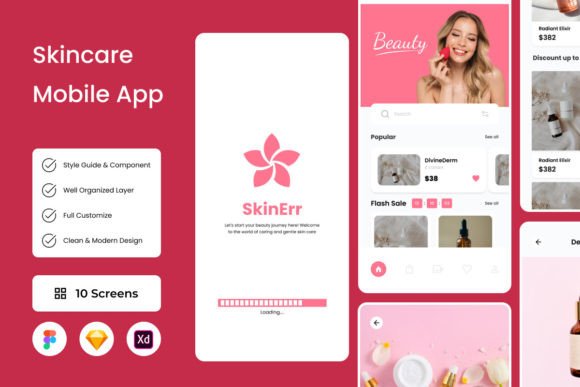
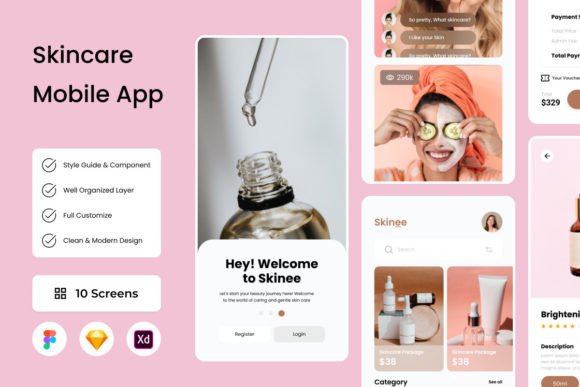
What immediately sets Glow apart is its intentional design language. The layout is clean and airy, using generous white space to let content breathe—a crucial element when your goal is to convey purity and efficacy. The color palette is soft yet sophisticated, featuring muted tones that feel luxurious without being pretentious. This isn’t a design that shouts for attention; it invites users in with a quiet confidence. For a designer or small business owner, this means you’re starting with a template that already understands the psychology of your audience. You’re not fighting against garish defaults; you’re building upon a foundation that inherently communicates trust and professionalism.
The practicality of the kit is another major strength. With layers meticulously organized and global text and color styles built in, making adjustments is intuitive. Need to swap a primary color to match your client’s brand guidelines? It’s a few clicks, not a hours-long hunt through disorganized files. This level of organization is a massive time-saver, especially when you’re juggling multiple projects or working with a team. It transforms the design process from a technical chore into a more fluid creative exercise, allowing you to focus on the unique story of the brand you’re building.
From Digital Blueprint to Tangible Brand Assets
While Glow is engineered for a mobile app, its visual principles are a goldmine for broader branding. The typographic hierarchy, the balance of imagery and text, the subtle use of color—these elements form a complete visual system. A brand strategist can extract the essence of the Glow aesthetic to inform a complete brand identity. Think about it: the same clean lines and serene palette that work on a phone screen can translate beautifully to product packaging, creating a shelf presence that feels modern and trustworthy. The way information is presented in the app’s skincare routines can inspire how you lay out instructions on a product box or a pamphlet.
For content creators and marketers, the design templates within the kit are a starting point for cohesive social media graphics. The same visual rhythm used for an in-app tutorial can guide the design of an Instagram carousel or a Pinterest pin. This consistency is what builds brand recognition. When a customer sees your product’s packaging, then your Instagram story, then your website, the visual throughline—inspired by that same core design language—builds a subconscious sense of familiarity and reliability. It’s the difference between looking like a hobbyist and presenting as a polished, professional operation.
Practical Applications Beyond the App Screen
Let’s get specific about where a design like this finds its home. The high-quality screen layouts are perfect for pitching a skincare startup to investors, providing a tangible vision of the user experience. For a web designer, the principles of Glow can inform a landing page design that feels just as intuitive and visually soothing. The organized file structure (available in .fig, .xd, .sketch, and .psd) means you can pull a single component—a beautifully designed testimonial card, a clean product grid—and adapt it for a print ad or a brochure. The open-source fonts ensure you can maintain the look across all materials without licensing headaches for the core assets.
Consider the entrepreneur launching a new line of serums. Using the Glow layout as a reference, they can work with a designer to create a website that doesn’t just list products but guides visitors through a personalized skincare journey, much like the app does. The visual cues for “hydration” or “rejuvenation” within the kit can inspire iconography and micro-animations on their site. This approach ensures that every touchpoint, from the app to the unboxing experience, tells a cohesive story. It’s about using a design system to create an ecosystem around your product, making the customer feel understood at every step.
Making It Your Own: Smart Customization
The real power of a tool like the Glow kit is unlocked through thoughtful customization. It’s a starting point, not a final product. The key is to view the pre-built layouts as a conversation starter. Ask yourself: Does this color palette truly reflect my brand’s energy, or should I shift the hue slightly warmer? Does this font pairing convey the right tone—perhaps swapping the serif for a more modern sans serif to feel more tech-forward? The global styles make these explorations efficient. You can test multiple variations quickly to see what resonates.
Always consider readability. A beautiful script font might look stunning in a header, but if your audience is reading lengthy skincare ingredient lists on a mobile screen, clarity must win. Use the provided hierarchy as a guide: bold for headlines, medium for subheads, regular for body text. Test your customized designs on actual devices. Does the contrast between text and background hold up in bright sunlight? Is the tap target for a “Shop Now” button large enough for easy interaction? These practical tests separate good design from great, usable design.
Finally, remember that while the preview images in the kit are for demonstration, the underlying design structure is yours to build upon. This is where you inject your unique vision. Use the organized layers to add your own photography, your own illustrations, your own brand voice. The goal isn’t to launch a clone of the demo, but to use its robust, well-considered framework to launch something that is uniquely and authentically yours—a digital experience that doesn’t just look radiant, but feels genuinely helpful and connected to the user’s desire for self-care and confidence. That’s the true glow.
Glow: Designing a Radiant Skincare App Experience
Imagine opening an app that feels like a gentle, knowledgeable friend guiding you through your skincare ritual. That immediate sense of calm, clarity, and trusted expertise is what the Glow - Skincare Mobile App UI kit is designed to evoke. It’s more than a collection of screens; it’s a carefully crafted visual language built for the modern beauty and wellness industry. For designers, entrepreneurs, and creators in this space, it offers a sophisticated starting point that understands the delicate balance between aesthetic appeal and functional clarity your audience expects.
The Visual Language of Modern Skincare
Glow’s strength lies in its thoughtful, user-centric design. The interface is clean and spacious, using a soft, neutral color palette that suggests purity and calm without feeling sterile. This isn’t just about looking pretty—it’s strategic. The ample white space reduces cognitive load, allowing users to focus on product information, routines, and their own skin goals. Typography is handled with a clear hierarchy, pairing elegant serif fonts for headings with highly readable sans-serif body text. This combination feels both luxurious and approachable, a crucial duality for building trust in a skincare brand.
Every element, from the rounded corners of buttons to the subtle shadows on product cards, contributes to a cohesive and inviting atmosphere. For a small business owner or startup founder, this means you’re not starting from zero. You have a design system that already speaks the right visual dialect. You can adapt the color scheme to match your brand’s specific ethos—perhaps deepening the greens for a natural brand or introducing a blush pink for a more romantic line—while maintaining the kit’s inherent sense of professionalism and ease.
From App Screens to a Full Brand Ecosystem
The true value of a well-designed UI kit like Glow is its versatility. The principles it embodies—clarity, elegance, and user empowerment—can seed an entire brand identity. The way information is presented in the app’s product pages or routine builders can directly inspire how you structure your website’s layout. The clean, informative card designs are perfect templates for social media graphics, whether you’re showcasing a new serum on Instagram or explaining an ingredient on Pinterest. This creates immediate visual consistency across all touchpoints.
Think beyond the digital screen. The typographic pairing and color harmonies within Glow can inform your packaging design. A label that echoes the app’s clean aesthetic will feel familiar to customers who’ve discovered you online. For print materials like brochures or in-store displays, the organized layout structure provides a blueprint for presenting complex information—like ingredient lists or step-by-step guides—in an accessible, non-intimidating way. It turns every piece of communication into a cohesive chapter of your brand’s story.
Practical Steps for Implementation and Adaptation
Getting started with a resource like this requires a strategic approach. First, audit the provided styles. The global text and color styles are your best friend. Before diving into customizing individual screens, establish your brand’s primary and secondary colors within the file’s style guide. This one step ensures every change you make propagates consistently, saving hours of manual adjustments and preventing visual dissonance down the line.
Next, consider font pairing carefully. While the kit includes open-source fonts, you may want to integrate a premium typeface that better captures your brand’s unique voice. Test pairings rigorously. A strong display font for headlines can add personality, but ensure it remains legible at smaller sizes for critical information. Always preview your designs on actual mobile devices to check tap target sizes and text readability. The goal is a beautiful interface that never sacrifices usability for style.
Finally, leverage the organized file structure to your advantage. The neatly labeled layers and components make it easy to repurpose elements. That beautifully designed progress tracker for a skincare routine could be adapted into a loyalty program graphic for your website. The subscription page layout could inspire the structure of an email newsletter. By thinking of the UI kit not as a finished product but as a library of expertly crafted components, you unlock endless possibilities for creating a unified, professional presence that resonates deeply with your target audience, building the kind of trust and recognition that turns casual users into devoted advocates.