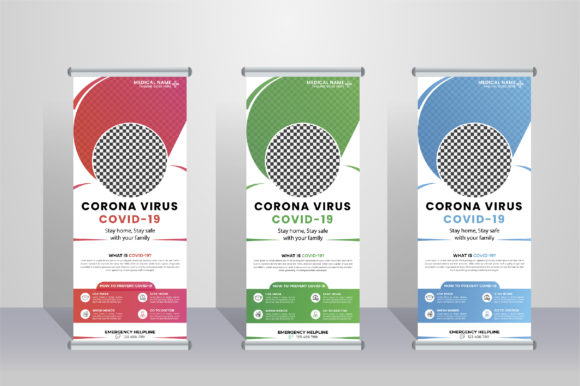
Roll Up Banner Design: Your Ultimate Portable Branding Solution
Imagine walking into a crowded trade show, a local business fair, or even a community event. The first thing that catches your eye isn't a pamphlet or a business card—it's a striking, professional banner standing tall, communicating a brand's message in seconds. That's the power of a well-executed roll-up banner. It’s your silent salesperson, your visual handshake, and often the first point of contact with potential customers. For anyone tasked with creating that crucial first impression, having a reliable, flexible, and professional design template isn't just helpful; it's essential.
More Than Just a Stand: The Anatomy of Effective Visual Communication
A roll-up banner is far more than a piece of printed fabric on a retractable stand. It's a strategic communication tool. Its vertical format naturally draws the eye upward, making it perfect for showcasing a headline, a key product image, or a compelling call to action. The challenge for designers, entrepreneurs, and marketers is creating a layout that is both visually arresting and clear from a distance. This is where a thoughtfully crafted design template becomes invaluable. A template built in a professional vector program like Adobe Illustrator offers unparalleled control. Every element—from the curvature of a logo to the kerning of a headline—can be meticulously adjusted, ensuring the final print output is crisp and flawless at its large 30×70 inch size.
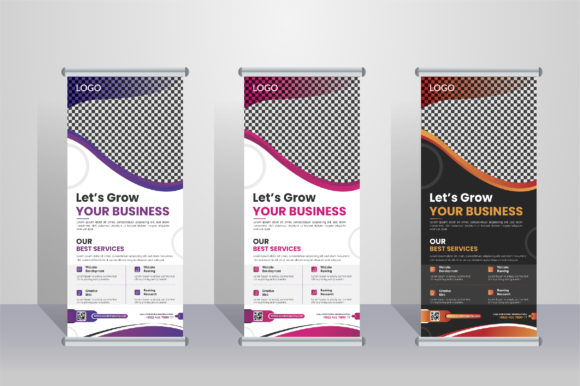
The true beauty of a layered, fully editable file lies in its adaptability. Need to change the primary brand color from a deep blue to a vibrant green? It's a few clicks away. Want to swap out a placeholder image for your own high-resolution product shot? The clipping masks are ready. This level of customization transforms a generic template into a bespoke brand asset. You're not locked into a rigid design; you're equipped with a professional framework that respects your unique brand identity. The inclusion of three distinct color variations provides a fantastic starting point for A/B testing different visual appeals or coordinating with various marketing campaigns throughout the year.
Practical Applications Across Your Brand Ecosystem
While its primary home might be at events, a well-designed banner's utility extends far beyond the expo hall. Consider how its core elements can inform and enhance your broader brand presence.
- Consistent Branding: The color palette, typography, and visual hierarchy established in your banner design should echo across all materials. Use the same fonts and color codes for your website headers, social media graphics, and email newsletters to build instant recognition.
- Logo Design & Packaging: The banner often features your logo prominently. This large-scale application tests its scalability and impact. The design principles used—balance, contrast, space—are directly transferable to refining your logo for packaging or merchandise.
- Digital & Print Marketing: The visual assets created for the banner (icons, illustrations, photo treatments) can be repurposed. A section of the banner could become a stunning website hero image. The call-to-action styling can be adapted for social media ads or printed flyers, ensuring a cohesive marketing suite.
- Editorial & Invitation Layouts: The structured yet creative approach to laying out information on a banner—using headlines, subheads, and body copy in a clear hierarchy—is a perfect practice ground for designing editorial spreads, event invitations, or digital product covers.
This interconnected use of design assets is what separates amateur efforts from professional brand building. Starting with a high-quality, editable template ensures that your foundational visual asset is built to professional standards, making every subsequent design task more efficient and consistent.
Crafting a Message That Resonates and Engages
A banner has mere seconds to communicate. Therefore, its design must prioritize clarity and impact. This begins with typography. Choosing the right font style is critical. A bold, clean sans-serif font often works best for headlines, ensuring maximum readability from across a room. Pair it with a more legible serif or sans-serif for any supporting text that might be read up close. The template's use of Google Fonts is a significant advantage, offering a vast library of high-quality, free-to-use typefaces that are optimized for both screen and print.
Color psychology plays a vital role. The three color variations included aren't just for aesthetic preference; they offer strategic options. A high-contrast color scheme will grab attention in a busy, chaotic environment, while a more subdued, sophisticated palette might be better suited for a professional conference or luxury product launch. Because the file is in CMYK color mode and print-ready at 150 DPI, you can be confident that the vibrant blue on your screen will be the same vibrant blue that rolls out of the printer, avoiding costly and disappointing color shifts.
From Template to Tailored Masterpiece: A Practical Guide
So, you've downloaded your roll-up banner design file. How do you ensure it becomes a powerful tool for your business? Here’s a straightforward approach:
- Define Your Core Message: Before you open the file, decide on the single most important thing you want viewers to know or do. Is it your brand name and tagline? A specific product offer? A website URL? This message should dominate the design.
- Gather Your Assets: Collect your highest-resolution logo files, brand guidelines (if you have them), professional photos, and finalized copy. Having these ready will streamline the editing process.
- Edit with Intention: Open the Adobe Illustrator file. Familiarize yourself with the layers. Replace placeholder text and images with your own. Experiment with the pre-designed color variations to see which aligns best with your brand and message. Adjust the size and placement of elements to create a balanced composition that guides the viewer's eye from the headline down to the contact information.
- Test for Readability: Zoom out to about 25% of the actual size on your screen. Can you still read the main headline? Is the contrast between text and background sufficient? If possible, print a small-scale proof to check the overall feel. Remember, the banner will be viewed from various distances and angles.
- Finalize and Export: Once satisfied, ensure all fonts are outlined or embedded (a standard practice for print-ready files) and export the final design as a high-resolution PDF, following your printer's specific guidelines.
This process transforms a static template into a dynamic component of your marketing toolkit. The initial investment in a professional, editable design layout pays dividends every time you use it, saving countless hours of design work and ensuring a consistently polished look that builds trust and engages your audience effectively. Whether you're a seasoned designer looking for a time-saving asset or a small business owner venturing into professional print marketing, starting with a robust and flexible template is the smartest first step toward creating a lasting visual impact.